| :::{default-domain} bzl |
| ::: |
| |
| # How to integrate a debugger |
| |
| This guide explains how to integrate a debugger |
| with your Python applications built with `rules_python`. |
| |
| There are two ways available: the {obj}`--debugger` flag, and the {any}`RULES_PYTHON_ADDITIONAL_INTERPRETER_ARGS` environment variable. |
| |
| ## {obj}`--debugger` flag |
| |
| ### Basic Usage |
| |
| The {obj}`--debugger` flag allows you to inject an extra dependency into `py_test` |
| and `py_binary` targets so that they have a custom debugger available at |
| runtime. The flag is roughly equivalent to manually adding it to `deps` of |
| the target under test. |
| |
| To use the debugger, you typically provide the `--debugger` flag to your `bazel run` command. |
| |
| Example command line: |
| |
| ```bash |
| bazel run --@rules_python//python/config_settings:debugger=@pypi//pudb \ |
| //path/to:my_python_binary |
| ``` |
| |
| This will launch the Python program with the `@pypi//pudb` dependency added. |
| |
| The exact behavior (e.g., waiting for attachment, breaking at the first line) |
| depends on the specific debugger and its configuration. |
| |
| :::{note} |
| The specified target must be in the requirements.txt file used with |
| `pip.parse()` to make it available to Bazel. |
| ::: |
| |
| ### Python `PYTHONBREAKPOINT` Environment Variable |
| |
| For more fine-grained control over debugging, especially for programmatic breakpoints, |
| you can leverage the Python built-in `breakpoint()` function and the |
| `PYTHONBREAKPOINT` environment variable. |
| |
| The `breakpoint()` built-in function, available since Python 3.7, |
| can be called anywhere in your code to invoke a debugger. The `PYTHONBREAKPOINT` |
| environment variable can be set to specify which debugger to use. |
| |
| For example, to use `pdb` (the Python Debugger) when `breakpoint()` is called: |
| |
| ```bash |
| PYTHONBREAKPOINT=pudb.set_trace bazel run \ |
| --@rules_python//python/config_settings:debugger=@pypi//pudb \ |
| //path/to:my_python_binary |
| ``` |
| |
| For more details on `PYTHONBREAKPOINT`, refer to the [Python documentation](https://docs.python.org/3/library/functions.html#breakpoint). |
| |
| ### Setting a default debugger |
| |
| By adding settings to your user or project `.bazelrc` files, you can have |
| these settings automatically added to your bazel invocations. e.g. |
| |
| ``` |
| common --@rules_python//python/config_settings:debugger=@pypi//pudb |
| common --test_env=PYTHONBREAKPOINT=pudb.set_trace |
| ``` |
| |
| Note that `--test_env` isn't strictly necessary. The `py_test` and `py_binary` |
| rules will respect the `PYTHONBREAKPOINT` environment variable in your shell. |
| |
| ## debugpy (e.g. vscode) |
| |
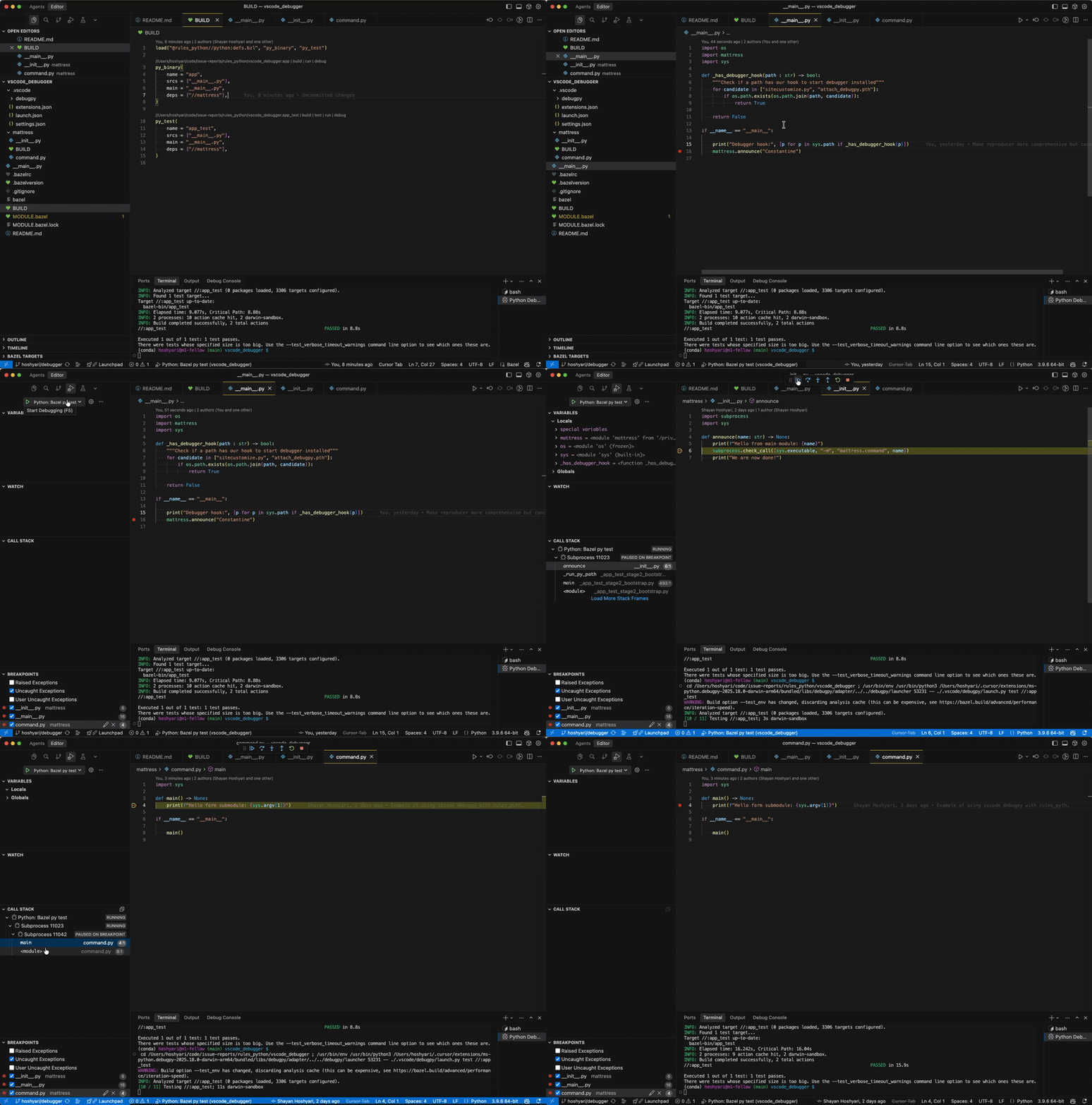
| You can integrate `debugpy` (i.e. the debugger used in vscode or PyCharm) by using a launcher script. This method leverages {any}`RULES_PYTHON_ADDITIONAL_INTERPRETER_ARGS` to inject the debugger into the Bazel-managed Python process. |
| |
| For the remainder of this document, we assume you are using vscode. |
| |
|  |
| |
| |
| 1. **Create a launcher script**: Save the following Python script as `.vscode/debugpy/launch.py` (or another location, adjusting `launch.json` accordingly). This script bridges VS Code's debugger with Bazel. |
| |
| <details> |
| <summary><code>launch.py</code></summary> |
| |
| ```python |
| """ |
| Launcher script for VS Code (debugpy). |
| |
| This script is not managed by Bazel; it is invoked by VS Code's launch.json to |
| wrap the Bazel command, injecting the debugger into the runtime environment. |
| """ |
| |
| import argparse |
| import os |
| import shlex |
| import subprocess |
| import sys |
| from typing import cast |
| |
| def main() -> None: |
| parser = argparse.ArgumentParser(description="Launch bazel debugpy with test or run.") |
| parser.add_argument("mode", choices=["test", "run"], help="Choose whether to run a bazel test or run.") |
| parser.add_argument("args", help="The bazel target to test or run (e.g., //foo:bar) and any additional args") |
| args = parser.parse_args() |
| |
| # Import debugpy, provided by VS Code |
| try: |
| # debugpy._vendored is needed for force_pydevd to perform path manipulation. |
| import debugpy._vendored # type: ignore[import-not-found] |
| |
| # pydev_monkey patches os and subprocess functions to handle new launched processes. |
| from _pydev_bundle import pydev_monkey # type: ignore[import-not-found] |
| except ImportError as exc: |
| print(f"Error: This script must be run via VS Code's debug adapter. Details: {exc}") |
| sys.exit(-1) |
| |
| # Prepare arguments for the monkey-patched process. |
| # is_exec=False ensures we don't replace the current process immediately. |
| patched_args = cast(list[str], pydev_monkey.patch_args(["python", "dummy.py"], is_exec=False)) |
| pydev_monkey.send_process_created_message() |
| |
| # Extract the injected arguments (skipping the dummy python executable and script). |
| # These args invoke the pydevd entrypoint which connects back to the debugger. |
| rules_python_interpreter_args = " ".join(patched_args[1:-1]) |
| |
| bzl_args = shlex.split(args.args) |
| if not bzl_args: |
| print("Error: At least one argument (the target) is required.") |
| sys.exit(-1) |
| |
| cmd = [ |
| "bazel", |
| args.mode, |
| # Propagate environment variables to the test/run environment. |
| "--test_env=PYDEVD_RESOLVE_SYMLINKS", |
| "--test_env=RULES_PYTHON_ADDITIONAL_INTERPRETER_ARGS", |
| "--test_env=IDE_PROJECT_ROOTS", |
| bzl_args[0], |
| ] |
| |
| if bzl_args[1:]: |
| if args.mode == "run": |
| # Append extra arguments for 'run' mode. |
| cmd.append("--") |
| cmd.extend(bzl_args[1:]) |
| elif args.mode == "test": |
| # Append extra arguments for 'test' mode. |
| cmd.extend([f"--test_arg={arg}" for arg in bzl_args[1:]]) |
| |
| env = { |
| **os.environ.copy(), |
| # Inject the debugger arguments into the rules_python toolchain. |
| "RULES_PYTHON_ADDITIONAL_INTERPRETER_ARGS": rules_python_interpreter_args, |
| # Ensure breakpoints hit the original source files, not Bazel's symlinks. |
| "PYDEVD_RESOLVE_SYMLINKS": "1", |
| } |
| |
| # Execute Bazel. |
| result = subprocess.run(cmd, env=env, check=False) |
| sys.exit(result.returncode) |
| |
| if __name__ == "__main__": |
| main() |
| ``` |
| </details> |
| |
| 2. **Configure `launch.json`**: Add the following configurations to your `.vscode/launch.json`. This tells VS Code to use the launcher script. |
| |
| <details> |
| <summary><code>launch.json</code></summary> |
| |
| ```json |
| { |
| "version": "0.2.0", |
| "configurations": [ |
| { |
| "name": "Python: Bazel py run", |
| "type": "debugpy", |
| "request": "launch", |
| "program": "${workspaceFolder}/.vscode/debugpy/launch.py", |
| "args": ["run", "${input:BazelArgs}"], |
| "console": "integratedTerminal" |
| }, |
| { |
| "name": "Python: Bazel py test", |
| "type": "debugpy", |
| "request": "launch", |
| "program": "${workspaceFolder}/.vscode/debugpy/launch.py", |
| "args": ["test", "${input:BazelArgs}"], |
| "console": "integratedTerminal" |
| } |
| ], |
| "inputs": [ |
| { |
| "id": "BazelArgs", |
| "type": "promptString", |
| "description": "Bazel target and arguments (e.g., //foo:bar --my-arg)" |
| } |
| ] |
| } |
| ``` |
| </details> |
| |
| Note: If you find `justMyCode` behavior is incompatible with Bazel's symlinks (causing breakpoints to be missed), you can set `"justMyCode": false` in `launch.json` and use the `IDE_PROJECT_ROOTS` environment variable (set to `"${workspaceFolder}"`) to explicitly map your workspace. |
| |
