| # Integrations |
| |
| ## VS Code (Official) |
| |
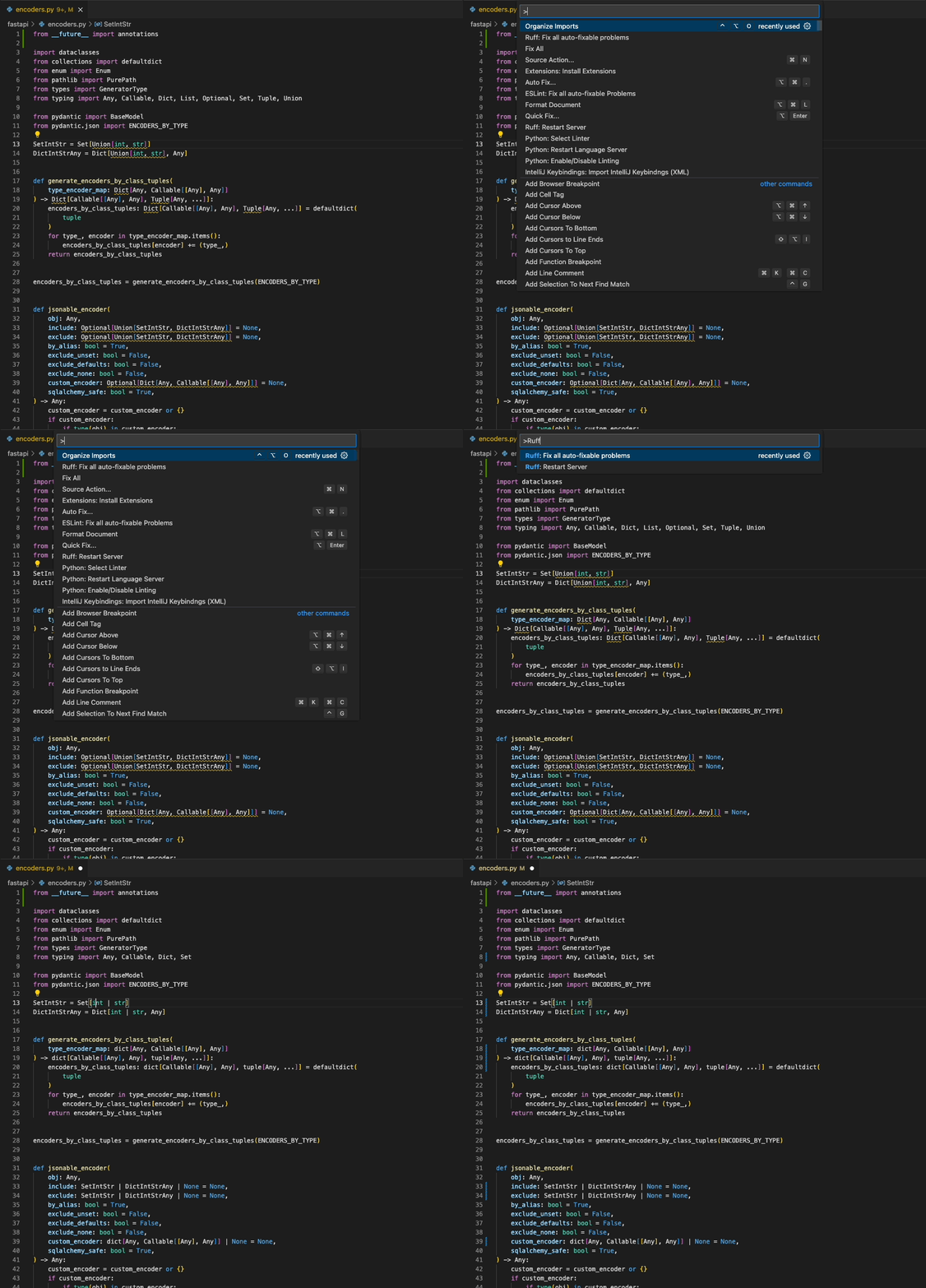
| Download the [Ruff VS Code extension](https://marketplace.visualstudio.com/items?itemName=charliermarsh.ruff), |
| which supports fix actions, import sorting, and more. |
| |
|  |
| |
| ## pre-commit |
| |
| Ruff can be used as a [pre-commit](https://pre-commit.com) hook via [`ruff-pre-commit`](https://github.com/astral-sh/ruff-pre-commit): |
| |
| ```yaml |
| - repo: https://github.com/astral-sh/ruff-pre-commit |
| # Ruff version. |
| rev: v0.3.2 |
| hooks: |
| # Run the linter. |
| - id: ruff |
| # Run the formatter. |
| - id: ruff-format |
| ``` |
| |
| To enable lint fixes, add the `--fix` argument to the lint hook: |
| |
| ```yaml |
| - repo: https://github.com/astral-sh/ruff-pre-commit |
| # Ruff version. |
| rev: v0.3.2 |
| hooks: |
| # Run the linter. |
| - id: ruff |
| args: [ --fix ] |
| # Run the formatter. |
| - id: ruff-format |
| ``` |
| |
| To run the hooks over Jupyter Notebooks too, add `jupyter` to the list of allowed filetypes: |
| |
| ```yaml |
| - repo: https://github.com/astral-sh/ruff-pre-commit |
| # Ruff version. |
| rev: v0.3.2 |
| hooks: |
| # Run the linter. |
| - id: ruff |
| types_or: [ python, pyi, jupyter ] |
| args: [ --fix ] |
| # Run the formatter. |
| - id: ruff-format |
| types_or: [ python, pyi, jupyter ] |
| ``` |
| |
| When running with `--fix`, Ruff's lint hook should be placed _before_ Ruff's formatter hook, and |
| _before_ Black, isort, and other formatting tools, as Ruff's fix behavior can output code changes |
| that require reformatting. |
| |
| When running without `--fix`, Ruff's formatter hook can be placed before or after Ruff's lint hook. |
| |
| (As long as your Ruff configuration avoids any [linter-formatter incompatibilities](formatter.md#conflicting-lint-rules), |
| `ruff format` should never introduce new lint errors, so it's safe to run Ruff's format hook _after_ |
| `ruff check --fix`.) |
| |
| ## Language Server Protocol (Official) |
| |
| Ruff supports the [Language Server Protocol](https://microsoft.github.io/language-server-protocol/) |
| via the [`ruff-lsp`](https://github.com/astral-sh/ruff-lsp) Python package, available on |
| [PyPI](https://pypi.org/project/ruff-lsp/). |
| |
| [`ruff-lsp`](https://github.com/astral-sh/ruff-lsp) enables Ruff to be used with any editor that |
| supports the Language Server Protocol, including [Neovim](https://github.com/astral-sh/ruff-lsp#example-neovim), |
| [Sublime Text](https://github.com/astral-sh/ruff-lsp#example-sublime-text), Emacs, and more. |
| |
| For example, to use `ruff-lsp` with Neovim, install `ruff-lsp` from PyPI along with |
| [`nvim-lspconfig`](https://github.com/neovim/nvim-lspconfig). Then, add something like the following |
| to your `init.lua`: |
| |
| ```lua |
| -- See: https://github.com/neovim/nvim-lspconfig/tree/54eb2a070a4f389b1be0f98070f81d23e2b1a715#suggested-configuration |
| local opts = { noremap=true, silent=true } |
| vim.keymap.set('n', '<space>e', vim.diagnostic.open_float, opts) |
| vim.keymap.set('n', '[d', vim.diagnostic.goto_prev, opts) |
| vim.keymap.set('n', ']d', vim.diagnostic.goto_next, opts) |
| vim.keymap.set('n', '<space>q', vim.diagnostic.setloclist, opts) |
| |
| -- Use an on_attach function to only map the following keys |
| -- after the language server attaches to the current buffer |
| local on_attach = function(client, bufnr) |
| -- Enable completion triggered by <c-x><c-o> |
| vim.api.nvim_buf_set_option(bufnr, 'omnifunc', 'v:lua.vim.lsp.omnifunc') |
| |
| -- Mappings. |
| -- See `:help vim.lsp.*` for documentation on any of the below functions |
| local bufopts = { noremap=true, silent=true, buffer=bufnr } |
| vim.keymap.set('n', 'gD', vim.lsp.buf.declaration, bufopts) |
| vim.keymap.set('n', 'gd', vim.lsp.buf.definition, bufopts) |
| vim.keymap.set('n', 'K', vim.lsp.buf.hover, bufopts) |
| vim.keymap.set('n', 'gi', vim.lsp.buf.implementation, bufopts) |
| vim.keymap.set('n', '<C-k>', vim.lsp.buf.signature_help, bufopts) |
| vim.keymap.set('n', '<space>wa', vim.lsp.buf.add_workspace_folder, bufopts) |
| vim.keymap.set('n', '<space>wr', vim.lsp.buf.remove_workspace_folder, bufopts) |
| vim.keymap.set('n', '<space>wl', function() |
| print(vim.inspect(vim.lsp.buf.list_workspace_folders())) |
| end, bufopts) |
| vim.keymap.set('n', '<space>D', vim.lsp.buf.type_definition, bufopts) |
| vim.keymap.set('n', '<space>rn', vim.lsp.buf.rename, bufopts) |
| vim.keymap.set('n', '<space>ca', vim.lsp.buf.code_action, bufopts) |
| vim.keymap.set('n', 'gr', vim.lsp.buf.references, bufopts) |
| vim.keymap.set('n', '<space>f', function() vim.lsp.buf.format { async = true } end, bufopts) |
| end |
| |
| -- Configure `ruff-lsp`. |
| local configs = require 'lspconfig.configs' |
| if not configs.ruff_lsp then |
| configs.ruff_lsp = { |
| default_config = { |
| cmd = { 'ruff-lsp' }, |
| filetypes = { 'python' }, |
| root_dir = require('lspconfig').util.find_git_ancestor, |
| init_options = { |
| settings = { |
| args = {} |
| } |
| } |
| } |
| } |
| end |
| require('lspconfig').ruff_lsp.setup { |
| on_attach = on_attach, |
| } |
| ``` |
| |
| Upon successful installation, you should see Ruff's diagnostics surfaced directly in your editor: |
| |
|  |
| |
| To use `ruff-lsp` with other editors, including Sublime Text and Helix, see the [`ruff-lsp` documentation](https://github.com/astral-sh/ruff-lsp#installation-and-usage). |
| |
| ## Language Server Protocol (Unofficial) |
| |
| Ruff is also available as the [`python-lsp-ruff`](https://github.com/python-lsp/python-lsp-ruff) |
| plugin for [`python-lsp-server`](https://github.com/python-lsp/python-lsp-ruff), both of which are |
| installable from PyPI: |
| |
| ```shell |
| pip install python-lsp-server python-lsp-ruff |
| ``` |
| |
| The LSP server can then be used with any editor that supports the Language Server Protocol. |
| |
| For example, to use `python-lsp-ruff` with Neovim, add something like the following to your |
| `init.lua`: |
| |
| ```lua |
| require'lspconfig'.pylsp.setup { |
| settings = { |
| pylsp = { |
| plugins = { |
| ruff = { |
| enabled = true |
| }, |
| pycodestyle = { |
| enabled = false |
| }, |
| pyflakes = { |
| enabled = false |
| }, |
| mccabe = { |
| enabled = false |
| } |
| } |
| } |
| }, |
| } |
| ``` |
| |
| ## Vim & Neovim |
| |
| Ruff can be integrated into any editor that supports the Language Server Protocol via [`ruff-lsp`](https://github.com/astral-sh/ruff-lsp) |
| (see: [Language Server Protocol](#language-server-protocol-official)), including Vim and Neovim. |
| |
| It's recommended that you use [`ruff-lsp`](https://github.com/astral-sh/ruff-lsp), the |
| officially supported LSP server for Ruff. To use `ruff-lsp` with Neovim, install `ruff-lsp` from |
| PyPI along with [`nvim-lspconfig`](https://github.com/neovim/nvim-lspconfig). Then, add something |
| like the following to your `init.lua`: |
| |
| ```lua |
| -- See: https://github.com/neovim/nvim-lspconfig/tree/54eb2a070a4f389b1be0f98070f81d23e2b1a715#suggested-configuration |
| local opts = { noremap=true, silent=true } |
| vim.keymap.set('n', '<space>e', vim.diagnostic.open_float, opts) |
| vim.keymap.set('n', '[d', vim.diagnostic.goto_prev, opts) |
| vim.keymap.set('n', ']d', vim.diagnostic.goto_next, opts) |
| vim.keymap.set('n', '<space>q', vim.diagnostic.setloclist, opts) |
| |
| -- Use an on_attach function to only map the following keys |
| -- after the language server attaches to the current buffer |
| local on_attach = function(client, bufnr) |
| -- Enable completion triggered by <c-x><c-o> |
| vim.api.nvim_buf_set_option(bufnr, 'omnifunc', 'v:lua.vim.lsp.omnifunc') |
| |
| -- Mappings. |
| -- See `:help vim.lsp.*` for documentation on any of the below functions |
| local bufopts = { noremap=true, silent=true, buffer=bufnr } |
| vim.keymap.set('n', 'gD', vim.lsp.buf.declaration, bufopts) |
| vim.keymap.set('n', 'gd', vim.lsp.buf.definition, bufopts) |
| vim.keymap.set('n', 'K', vim.lsp.buf.hover, bufopts) |
| vim.keymap.set('n', 'gi', vim.lsp.buf.implementation, bufopts) |
| vim.keymap.set('n', '<C-k>', vim.lsp.buf.signature_help, bufopts) |
| vim.keymap.set('n', '<space>wa', vim.lsp.buf.add_workspace_folder, bufopts) |
| vim.keymap.set('n', '<space>wr', vim.lsp.buf.remove_workspace_folder, bufopts) |
| vim.keymap.set('n', '<space>wl', function() |
| print(vim.inspect(vim.lsp.buf.list_workspace_folders())) |
| end, bufopts) |
| vim.keymap.set('n', '<space>D', vim.lsp.buf.type_definition, bufopts) |
| vim.keymap.set('n', '<space>rn', vim.lsp.buf.rename, bufopts) |
| vim.keymap.set('n', '<space>ca', vim.lsp.buf.code_action, bufopts) |
| vim.keymap.set('n', 'gr', vim.lsp.buf.references, bufopts) |
| vim.keymap.set('n', '<space>f', function() vim.lsp.buf.format { async = true } end, bufopts) |
| end |
| |
| -- Configure `ruff-lsp`. |
| -- See: https://github.com/neovim/nvim-lspconfig/blob/master/doc/server_configurations.md#ruff_lsp |
| -- For the default config, along with instructions on how to customize the settings |
| require('lspconfig').ruff_lsp.setup { |
| on_attach = on_attach, |
| init_options = { |
| settings = { |
| -- Any extra CLI arguments for `ruff` go here. |
| args = {}, |
| } |
| } |
| } |
| ``` |
| |
| Ruff is also available as part of the [coc-pyright](https://github.com/fannheyward/coc-pyright) |
| extension for `coc.nvim`. |
| |
| <details> |
| <summary>With the <a href="https://github.com/dense-analysis/ale">ALE</a> plugin for (Neo)Vim.</summary> |
| |
| ```vim |
| let g:ale_linters = { "python": ["ruff"] } |
| let g:ale_fixers = { |
| \ "python": ["black", "ruff"], |
| \} |
| ``` |
| |
| </details> |
| |
| <details> |
| <summary> |
| Ruff can also be integrated via |
| <a href="https://github.com/neovim/nvim-lspconfig/blob/master/doc/server_configurations.md#efm"> |
| <code>efm</code> |
| </a> |
| in just a |
| <a href="https://github.com/JafarAbdi/myconfigs/blob/6f0b6b2450e92ec8fc50422928cd22005b919110/efm-langserver/config.yaml#L14-L20"> |
| few lines. |
| </a> |
| </summary> |
| <br> |
| |
| ```yaml |
| tools: |
| python-ruff: &python-ruff |
| lint-command: "ruff check --config ~/myconfigs/linters/ruff.toml --quiet ${INPUT}" |
| lint-stdin: true |
| lint-formats: |
| - "%f:%l:%c: %m" |
| format-command: "ruff check --stdin-filename ${INPUT} --config ~/myconfigs/linters/ruff.toml --fix --exit-zero --quiet -" |
| format-stdin: true |
| ``` |
| |
| </details> |
| |
| <details> |
| <summary> |
| With the <a href="https://github.com/stevearc/conform.nvim"><code>conform.nvim</code></a> plugin for Neovim. |
| </summary> |
| <br> |
| |
| ```lua |
| require("conform").setup({ |
| formatters_by_ft = { |
| python = { |
| -- To fix lint errors. |
| "ruff_fix", |
| -- To run the Ruff formatter. |
| "ruff_format", |
| }, |
| }, |
| }) |
| ``` |
| |
| </details> |
| |
| <details> |
| <summary> |
| With the <a href="https://github.com/mfussenegger/nvim-lint"><code>nvim-lint</code></a> plugin for Neovim. |
| </summary> |
| |
| ```lua |
| require("lint").linters_by_ft = { |
| python = { "ruff" }, |
| } |
| ``` |
| |
| </details> |
| |
| ## PyCharm (External Tool) |
| |
| Ruff can be installed as an [External Tool](https://www.jetbrains.com/help/pycharm/configuring-third-party-tools.html) |
| in PyCharm. Open the Preferences pane, then navigate to "Tools", then "External Tools". From there, |
| add a new tool with the following configuration: |
| |
|  |
| |
| Ruff should then appear as a runnable action: |
| |
|  |
| |
| ## PyCharm (Unofficial) |
| |
| Ruff is also available as the [Ruff](https://plugins.jetbrains.com/plugin/20574-ruff) plugin on the |
| IntelliJ Marketplace (maintained by @koxudaxi). |
| |
| ## Emacs (Unofficial) |
| |
| Ruff is available as [`flymake-ruff`](https://melpa.org/#/flymake-ruff) on MELPA: |
| |
| ```elisp |
| (require 'flymake-ruff) |
| (add-hook 'python-mode-hook #'flymake-ruff-load) |
| ``` |
| |
| Ruff is also available as [`emacs-ruff-format`](https://github.com/scop/emacs-ruff-format): |
| |
| ```elisp |
| (require 'ruff-format) |
| (add-hook 'python-mode-hook 'ruff-format-on-save-mode) |
| ``` |
| |
| Alternatively, it can be used via the [Apheleia](https://github.com/radian-software/apheleia) formatter library, by setting this configuration: |
| |
| ```emacs-lisp |
| (add-to-list 'apheleia-mode-alist '(python-mode . ruff)) |
| (add-to-list 'apheleia-mode-alist '(python-ts-mode . ruff)) |
| ``` |
| |
| ## TextMate (Unofficial) |
| |
| Ruff is also available via the [`textmate2-ruff-linter`](https://github.com/vigo/textmate2-ruff-linter) |
| bundle for TextMate. |
| |
| ## mdformat (Unofficial) |
| |
| [mdformat](https://mdformat.readthedocs.io/en/stable/users/plugins.html#code-formatter-plugins) is |
| capable of formatting code blocks within Markdown. The [`mdformat-ruff`](https://github.com/Freed-Wu/mdformat-ruff) |
| plugin enables mdformat to format Python code blocks with Ruff. |
| |
| ## GitHub Actions |
| |
| GitHub Actions has everything you need to run Ruff out-of-the-box: |
| |
| ```yaml |
| name: CI |
| on: push |
| jobs: |
| build: |
| runs-on: ubuntu-latest |
| steps: |
| - uses: actions/checkout@v4 |
| - name: Install Python |
| uses: actions/setup-python@v5 |
| with: |
| python-version: "3.11" |
| - name: Install dependencies |
| run: | |
| python -m pip install --upgrade pip |
| pip install ruff |
| # Update output format to enable automatic inline annotations. |
| - name: Run Ruff |
| run: ruff check --output-format=github . |
| ``` |
| |
| Ruff can also be used as a GitHub Action via [`ruff-action`](https://github.com/chartboost/ruff-action). |
| |
| By default, `ruff-action` runs as a pass-fail test to ensure that a given repository doesn't contain |
| any lint rule violations as per its [configuration](https://github.com/astral-sh/ruff/blob/main/docs/configuration.md). |
| However, under-the-hood, `ruff-action` installs and runs `ruff` directly, so it can be used to |
| execute any supported `ruff` command (e.g., `ruff check --fix`). |
| |
| `ruff-action` supports all GitHub-hosted runners, and can be used with any published Ruff version |
| (i.e., any version available on [PyPI](https://pypi.org/project/ruff/)). |
| |
| To use `ruff-action`, create a file (e.g., `.github/workflows/ruff.yml`) inside your repository |
| with: |
| |
| ```yaml |
| name: Ruff |
| on: [ push, pull_request ] |
| jobs: |
| ruff: |
| runs-on: ubuntu-latest |
| steps: |
| - uses: actions/checkout@v4 |
| - uses: chartboost/ruff-action@v1 |
| ``` |
| |
| Alternatively, you can include `ruff-action` as a step in any other workflow file: |
| |
| ```yaml |
| - uses: chartboost/ruff-action@v1 |
| ``` |
| |
| `ruff-action` accepts optional configuration parameters via `with:`, including: |
| |
| - `version`: The Ruff version to install (default: latest). |
| - `args`: The command-line arguments to pass to Ruff (default: `"check"`). |
| - `src`: The source paths to pass to Ruff (default: `"."`). |
| |
| For example, to run `ruff check --select B ./src` using Ruff version `0.0.259`: |
| |
| ```yaml |
| - uses: chartboost/ruff-action@v1 |
| with: |
| version: 0.0.259 |
| args: check --select B |
| src: "./src" |
| ``` |
